
Why increase CTR?
Increasing CTR can be important – yes! – but it all depends on the objectives and strategy.
One thing is certain, there are no magic formulas. Remember that in addition to ads being subject to numerous factors taking into account the increasingly complex algorithm, Adwords is not an exact science.
But why increase the CTR of paid Google ads? Because the adwords is here to stay! And in this sense, it is preferable to have healthy campaigns.
So, here are some tips that helped me achieve my initial goal with an existing account: Increase CTR!
Increase Adwords CTR
- Clear Keywords
- Introduce Negative Words
- Insert Long Tail Keywords
- Create More Ads
- Introduce Extensions
- Schedule Ads
- Increase Maximum CPC
- Test
Clear Keywords

If you start working on an account that is already active, you will most likely have to clean up the keywords already entered.
The lack of updating words is very common – remember that search trends change over time and season. And don't leave your words on autopilot or you run the risk of not keeping your campaigns healthy.
To carry out correct cleaning it is necessary to take into account several factors, but they can start with the average position, the quality index, the conversions as well as the CTR itself. However, it is something that is up to you. It all depends on the objectives already established.
How to make?
In 'Campaigns' click on 'Keywords'. Then they can pause the keyword or even delete it.
Introduce Negative Words
As is known, one of the ways sponsored links are targeted in search engines is by keywords associated with the ads. They may have various types of correspondence. There is, however, another way – also very effective – of targeting ads. The use of negative words.
Negative keywords are important as they help reduce ad exposure, reach more relevant people and increase Return on Investment (ROI).
Example: if you sell footballs you don't want your ad to appear to people looking for billiard balls!
How to make?
In 'Campaigns', click on 'Keywords' and right below you will find the 'Negative-Words' tab. Click there then just add words in '+ Keywords'.
Insert Long Tail Keywords
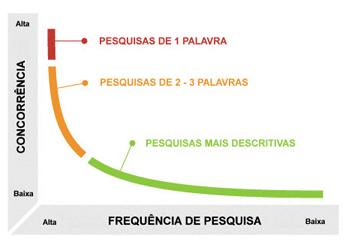
Use longer keywords, also known as long-tail keywords. They help to reach a more specific audience where there is not as much competition, and the lower the competition, the lower the cost.
How to make?
This one is simple. Just add '+ Keyword' in 'Campaign'.
Create More Ads
Never create just one ad. Create several – never less than 3, and let Google display the ads for 7/15 days. After this time of exposure to potential customers, they can really understand which ad has the best publication rate, which has the most clicks, which converts the most, which has the best CTR, etc.
From here, and after this initial tuning, you can now have a more accurate idea of what users want. Carrying out these tests should not stop here. They can and should continue to adjust the “chosen” ad, creating several versions until they reach the conclusion that there is no more room for evolution – which I doubt.
How to make?
Creativity + Relevance + Landing Page
Introduce Extensions
One of the easiest ways to increase CTR is by introducing extensions. They help to provide additional information, making the ad more substantial, thus making it more prominent in relation to other ads.
You can add extensions sitelinks, location, calling, application, comments, annotations, price, structured fragments, among others – New extensions continue to appear.
Extensions have no associated cost, you will only be charged for clicking on the ad as usual.
How to make?
Click on your 'Campaign' and then on 'Ad Extension'. In the 'View' tab, define which extension you want to work with and then just click on '+ Extension'. (Like ads, extensions are subject to verification)
Schedule Ads
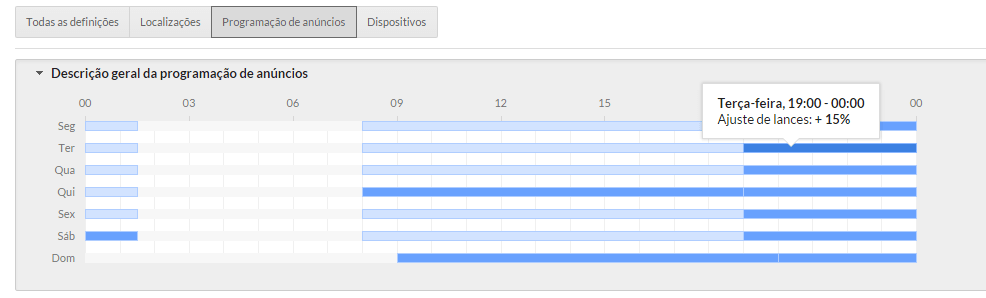
Define when ads appear. Schedule ads for certain days of the week or at a certain time. The more you know your target audience, the easier it will be to optimize your campaigns.
This can be a very effective way of segmenting your audience – remember that there are times when ads generate more traffic or generate more conversions. They can also adjust the bid (increasing or decreasing) for a specific day or time.
How to make?
In 'Campaigns', click on 'Settings' and then click on 'Ad Scheduling'. After these steps, just click on '+ Ad Scheduling' and voilà.
Increase Maximum CPC
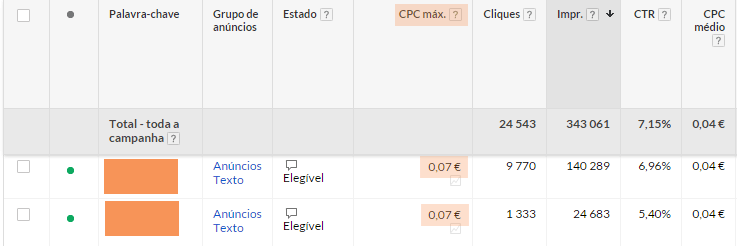
Increasing the Maximum CPC can be quite dangerous if you don't understand the 'science' around the Throw (It's well worth spending a bit of time trying to understand how it works).
The Maximum CPC can be defined either for the campaign or for a given keyword. By increasing the CPC we are increasing the position of the ad and the better it is positioned, the more likely it is to be clicked on.
Example: if you start to get a lot of impressions but clicks are not keeping up with this increase – and the CTR has decreased – it may be time to increase the Maximum CPC. If you have any doubts about the Maximum CPC you should use, you can use the tool 'Bid Adjustment Simulator'.
How to make? (simplified form)
In 'Campaigns' click on the 'Keywords' tab. Then choose which keyword(s) you want to increase. Once selected, click on the 'Bid Strategy' tab and then on 'Use manual CPC bidding'. Set the value and finish by clicking 'Make changes'.
Last words
Test, test and test. Segment, segment, segment.
There are no magic formulas or anything like that. There are good practices, good tips and many good – and bad – ideas. In the end, it all comes down to the objectives and strategies outlined and whether or not these are working.
“Never stop testing, and your advertising will never stop improving.”
David Ogilvy


